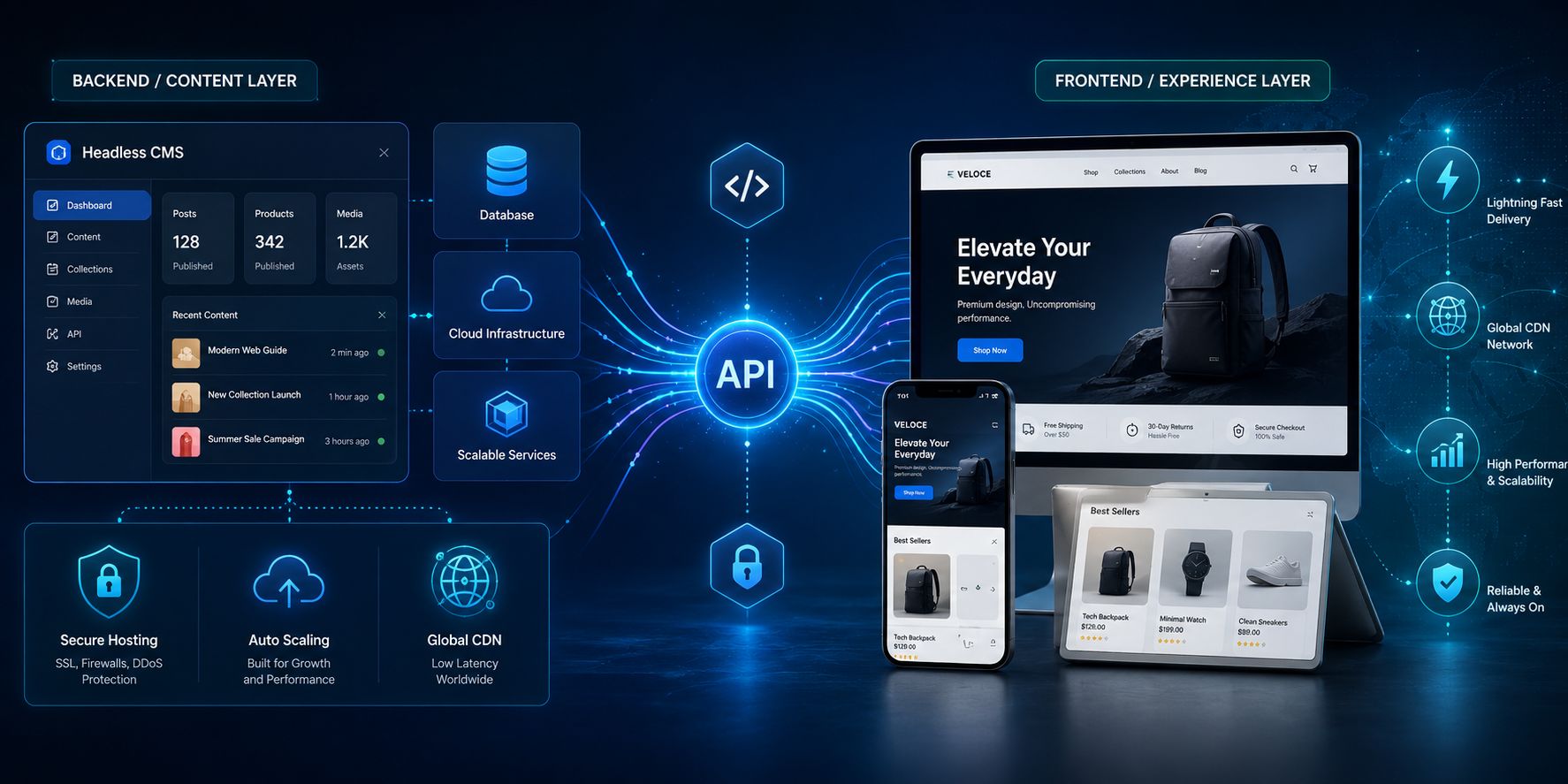
The way businesses build and host websites is changing. For many years, the standard website model was simple: install a content management system, choose a theme, add pages, install plugins, and let the same system handle both the administration area and the public website. WordPress, Joomla, Drupal, Magento, and many other platforms were built around this all-in-one approach.
That traditional model is still useful, especially for smaller websites and businesses that want a straightforward editing experience. But modern websites are being asked to do much more than display a few pages. Businesses now want faster load times, stronger security, better search performance, mobile app integration, ecommerce flexibility, content delivery across multiple channels, and the ability to scale quickly when traffic spikes. These pressures are one reason headless architecture and headless hosting are becoming more popular.
The article provided makes several key points: headless architecture separates the front end from the back end, can improve speed, can reduce exposure of the database and admin system, gives designers more creative freedom, helps handle traffic spikes, and prepares businesses to publish content across multiple devices and channels. Those are good starting points, but a complete explanation also needs to cover when headless hosting is useful, when it is not, what software is involved, and what kind of hosting environment is required.
What Is Headless Hosting?
Headless hosting refers to hosting a website or web application where the public-facing front end is separated from the content, database, or ecommerce back end.
In a traditional website, the “head” is the visible website: the layout, theme, menus, buttons, product pages, blog posts, images, and checkout pages. The “body” is the back-end system: the database, admin dashboard, content editor, product catalogue, user accounts, and business logic.
In a traditional WordPress site, for example, WordPress manages the content and also generates the public pages visitors see. The theme, database, plugins, admin area, and public site are closely connected. When someone visits a page, the server may need to query the database, run PHP code, load plugins, assemble the page, and then send it to the browser.
In a headless setup, the back end still manages content, but it no longer controls the full public website experience. Instead, the public website is built separately using a modern front-end framework such as Next.js, Astro, Nuxt, React, Vue, SvelteKit, or a static site generator. The front end receives content from the back end using APIs.
WordPress, for example, can be used as a headless CMS because its REST API allows applications to send and receive JSON data for posts, pages, taxonomies, and other content types. ([WordPress Developer Resources][1]) WooCommerce also provides REST API capabilities for ecommerce use cases. ([The WooCommerce Developer Blog][2]) A simplified headless setup looks like this:
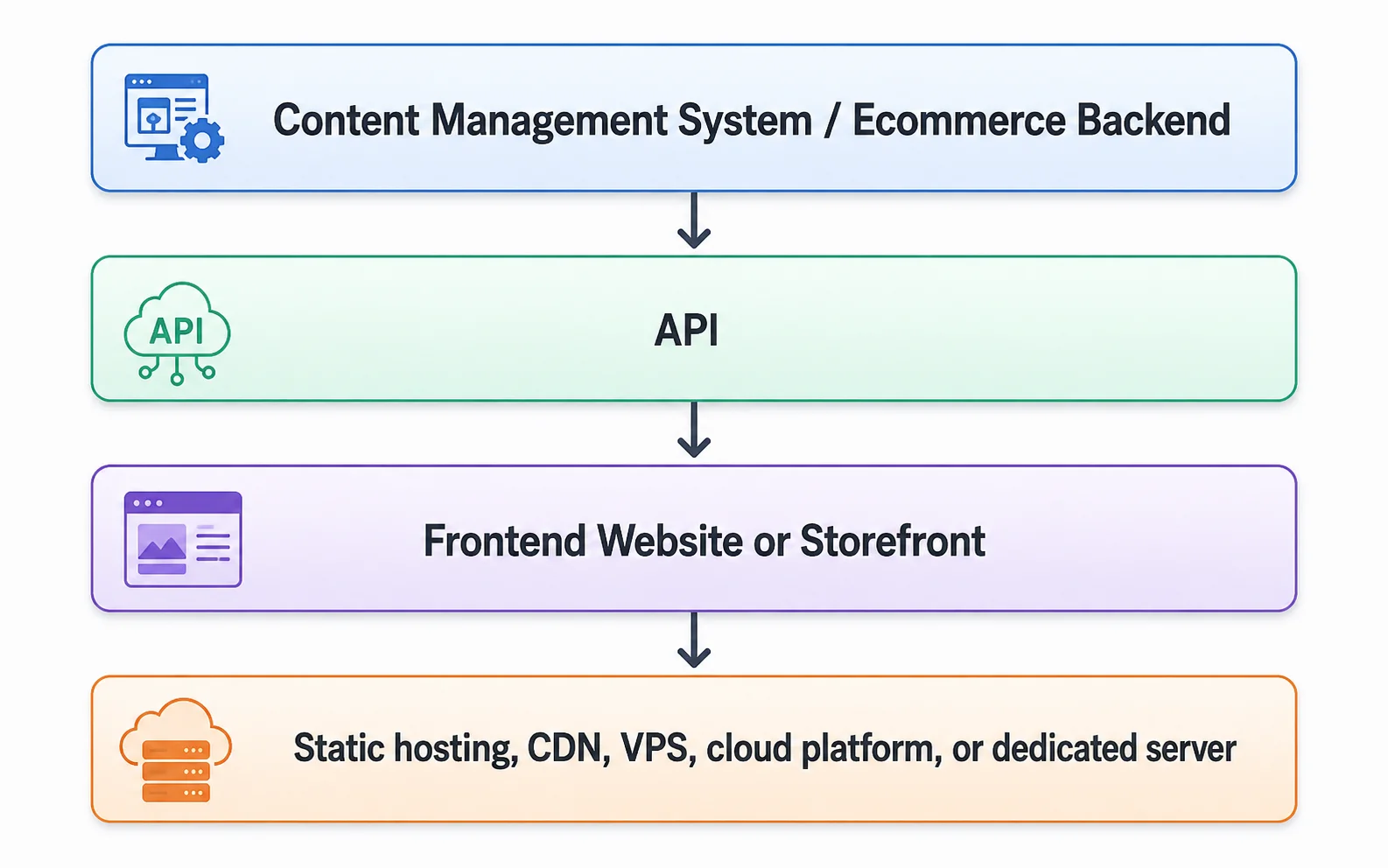
This separation is what makes headless hosting different. The CMS is no longer the whole website. It becomes a content engine. The front end becomes a separate presentation layer.
Why Headless Hosting Is Growing
The biggest reason headless hosting is growing is that businesses want websites that are faster, more flexible, more secure, and easier to adapt to different platforms.
A traditional CMS is often convenient, but it can become heavy. Themes, plugins, database queries, and server-side rendering can slow down the user experience, especially if the site is not carefully optimized. A headless front end can often be generated as static files or partially pre-rendered pages, making it faster to deliver through a CDN or standard web server.
Next.js, for example, can be self-hosted using a Node.js server, Docker, or static HTML files. ([Next.js][3]) Next.js static export can be hosted on any web server capable of serving HTML, CSS, and JavaScript assets, including Nginx or Apache. ([Next.js][4]) Astro also supports static sites and server rendering through adapters for different hosting environments. ([Astro Documentation][5])
This matters because website performance is no longer just a technical issue. Page speed affects user experience, ecommerce conversion, search visibility, advertising performance, and customer trust. A slow site can make a business look outdated or unreliable. A fast site can make the same business feel more professional.
Speed and Performance
One of the strongest advantages of headless hosting is performance.
In many headless builds, the front-end pages can be generated ahead of time. Instead of building every page from scratch for every visitor, the site can serve prebuilt files. These files can be cached globally and delivered from locations close to the visitor.
For a business website, brochure site, blog, documentation site, or marketing site, this can be extremely efficient. If the content does not change every second, there is no need to query the database on every request. The site can rebuild when content changes, then serve fast static pages to visitors.
For ecommerce, the picture is more complex. Product pages, category pages, and marketing content can often be cached or prebuilt. But carts, customer accounts, checkout, inventory, pricing rules, shipping calculations, and payment flows may require dynamic server-side logic. This is why headless ecommerce needs careful planning. The public storefront can be fast, but the business still needs reliable APIs, secure checkout, and accurate product data.
A good headless hosting environment needs to support the chosen rendering model. A static Astro site can run almost anywhere. A dynamic Next.js ecommerce storefront may need a Node.js runtime, reverse proxy, caching layer, build pipeline, and monitoring. The hosting choice should match the architecture.
Security Benefits — and Limits
Headless architecture can improve security, but it does not magically make a website secure.
The security advantage comes from separation. If the public website is mostly static files, there may be less attack surface than a traditional CMS where the database, admin login, plugins, and public theme are tightly connected. A headless WordPress setup, for example, might place the WordPress admin at `cms.example.com` and the public website at `example.com`. The CMS can be locked down, hidden from casual visitors, protected behind extra authentication, or limited by firewall rules.
This can reduce risk, especially compared with a traditional site where vulnerable plugins or themes are directly exposed through the public website.
However, the back end still exists. The CMS still needs updates. APIs still need authentication, rate limits, validation, and secure configuration. Admin users still need strong passwords and multi-factor authentication. The database still needs backups and protection. Secrets and API keys still need to be managed safely.
OWASP describes its Top 10 as a standard awareness document representing broad consensus on critical web application security risks. ([OWASP Foundation][6]) Those risks still matter in a headless environment. Broken access control, injection, security misconfiguration, vulnerable components, and authentication failures do not disappear just because the site is headless.
So the better way to say it is this: headless hosting can reduce some risks by separating the public front end from the back end, but it also introduces new responsibilities around APIs, build systems, authentication, and deployment security.
Creative Freedom for Designers and Developers
Another reason headless hosting is growing is design flexibility.
Traditional CMS websites often depend heavily on themes. A business chooses a theme, customizes it, adds plugins, and works within the rules of that system. This can be efficient, but it can also limit the experience. Designers may struggle to create unusual layouts, advanced animations, custom product configurators, interactive calculators, or highly optimized landing pages if they are constrained by the CMS theme structure.
Headless architecture changes that. Designers and developers can build the front end using modern tools and component-based workflows. They can create custom layouts, reusable design systems, interactive elements, and app-like experiences while still allowing non-technical staff to manage content in a CMS.
This is one of the most practical uses of headless WordPress. A company can keep the familiar WordPress editor for staff while giving developers freedom to build a modern front end with Astro, Next.js, Nuxt, or another framework. The content team keeps its workflow; the development team gets more control over performance and design.
Omnichannel Publishing
Traditional websites were designed mainly for browsers. But modern businesses may need to publish the same content to a website, mobile app, customer portal, digital kiosk, smart display, social campaign, partner system, or internal dashboard.
Headless architecture supports this better because the content is delivered through APIs. Instead of being locked inside one website theme, the content becomes structured data that can be reused across different channels.
For example, a company could write a product description once in the CMS and use it on:
- the main website,
- * a mobile app,
- * a dealer portal,
- * an in-store display,
- * an email campaign,
- * a comparison tool,
- * a product feed.
This does not mean every small business needs headless architecture. But for brands managing lots of content across multiple platforms, the ability to publish once and reuse content everywhere can be a major advantage.
Better Scaling During Traffic Spikes
Headless hosting can also help with traffic spikes.
In a traditional dynamic website, a sudden increase in visitors can increase database queries, PHP processes, plugin execution, and server load. A sale, viral social media post, advertising campaign, or product launch can overload the server if caching and infrastructure are not properly configured.
With a static or pre-rendered headless front end, much of the traffic can be served without touching the database. The public site can be cached at the edge, while the back end remains protected and used mainly for content editing, API requests, and dynamic functions.
This is especially useful for marketing pages, landing pages, product pages, help centers, and documentation. It is also useful for ecommerce storefronts, although dynamic commerce functions still require careful infrastructure design.
Common Headless Software Choices
There is no single headless hosting stack. The right software depends on the project.
For business websites and blogs, common choices include:
Purpose | Common software
- Front end | Astro, Next.js, Nuxt, React, Vue, SvelteKit
- CMS | WordPress, Strapi, Directus, Sanity, Contentful, Ghost|
- Database | MySQL, MariaDB, PostgreSQL
- Deployment | GitHub, GitLab, CI/CD pipelines
- Hosting | VPS, dedicated server, Vercel, Netlify, Cloudflare Pages, static hosting
For ecommerce, common choices include:
Purpose | Common software
- Ecommerce backend | WooCommerce, Shopify headless, BigCommerce headless, Magento/Adobe Commerce, Medusa, Saleor
- Storefront | Next.js, React, Vue, Nuxt, Astro for simpler storefronts
- Payments | Stripe, PayPal, Moneris, Square, or platform payment systems
- Search | Algolia, Meilisearch, Elasticsearch/OpenSearch
- Hosting | VPS, cloud, dedicated server, managed platforms, CDN-backed deployments
For a small business, headless WordPress with Astro or Next.js may be one of the most approachable paths. For a custom ecommerce application, a developer-focused stack such as Next.js with Medusa or Saleor may make sense, but it requires more technical skill.
How Headless Hosting Is Actually Hosted
There are several ways to host a headless site.
The simplest is a **static front end with a separate CMS**. The CMS might run on a VPS or managed host, while the public front end is built into static files and hosted on a CDN, Apache, Nginx, Cloudflare Pages, Netlify, or another static hosting platform.
A second model is **full-stack VPS hosting**. In this setup, the business hosts the CMS, database, API, and front end on a VPS or dedicated server. A typical stack might include Ubuntu, Nginx, Node.js, PostgreSQL or MariaDB, systemd or PM2, SSL certificates, firewall rules, backups, and monitoring.
A third model is a **hybrid deployment**. The front end runs on a specialized platform such as Vercel, Netlify, or Cloudflare Pages, while the back end runs on a VPS or managed database. This is popular because it gives developers excellent deployment tools while still allowing control over the CMS or application backend.
Each model has tradeoffs. Static hosting is simple and fast. VPS hosting gives more control. Hybrid hosting gives convenience but introduces platform dependency.
The Downsides of Headless Hosting
Headless hosting is powerful, but it is not always the right choice.
The first downside is complexity. A traditional WordPress site can be installed, themed, edited, and maintained in one place. A headless setup may involve a CMS, API, frontend framework, build system, Git repository, deployment pipeline, CDN, environment variables, authentication rules, and hosting configuration. That is more moving parts.
The second downside is cost. While static hosting can be inexpensive, development costs may be higher. A business may need a developer to build the front end, connect APIs, manage deployments, and troubleshoot issues.
The third downside is plugin compatibility. In traditional WordPress, many plugins automatically affect the public site. In headless WordPress, some plugins may not work the same way because the front end is no longer rendered by WordPress themes. Forms, SEO metadata, search, ecommerce, memberships, and multilingual content may need extra integration work.
The fourth downside is editorial preview. Content teams often want to preview exactly how a page will look before publishing. In headless systems, preview workflows can be more complicated and must be intentionally built.
For simple websites, a well-optimized traditional CMS may still be the better choice. Headless hosting is most valuable when the business needs performance, flexibility, multi-channel publishing, custom design, or scaling benefits that justify the additional complexity.
Who Should Consider Headless Hosting?
Headless hosting is a strong fit for:
- businesses that care deeply about speed and performance,
- * ecommerce stores with custom storefront requirements,
- * companies publishing content to multiple channels,
- * agencies building modern front-end experiences,
- * SaaS companies with marketing sites and documentation,
- * brands that need custom design beyond standard themes,
- * businesses separating public websites from private backend systems,
- * high-traffic sites that benefit from static generation and CDN delivery.
It may be less suitable for:
- very small websites with simple needs,
- * businesses without technical support,
- * clients who depend heavily on traditional CMS plugins,
- * projects where speed to launch matters more than architecture,
- * users who want everything managed in one familiar dashboard.
Final Thoughts
Headless hosting is growing because the web has changed. Businesses want websites that are faster, safer, more flexible, easier to scale, and ready to publish content across more than one channel. Separating the front end from the back end gives developers more control and can give businesses a better-performing digital presence.
But headless is not magic. It does not remove the need for security, backups, monitoring, updates, compliance, or good hosting. It simply changes the architecture. A poorly managed headless site can still be slow, insecure, or expensive. A well-managed traditional site can still be perfectly appropriate for many businesses.
The best way to think about headless hosting is this: it is a modern approach for businesses that have outgrown the limitations of all-in-one website platforms and need more control over performance, design, content delivery, and scalability.
For a basic business website, traditional hosting may still be enough. For a performance-focused brand, growing ecommerce store, content-rich organization, or company building across multiple digital channels, headless hosting can provide a stronger foundation for the future.
[1]: https://developer.wordpress.org/rest-api/?utm_source=chatgpt.com "REST API Handbook - WordPress Developer Resources"
[2]: https://developer.woocommerce.com/docs/apis/rest-api/?utm_source=chatgpt.com "WooCommerce REST API"
[3]: https://nextjs.org/docs/app/guides/self-hosting?utm_source=chatgpt.com "Guides: Self-Hosting"
[4]: https://nextjs.org/docs/app/guides/static-exports?utm_source=chatgpt.com "Guides: Static Exports"
[5]: https://docs.astro.build/en/guides/on-demand-rendering/?utm_source=chatgpt.com "On-demand rendering - Astro Docs"
[6]: https://owasp.org/www-project-top-ten/?utm_source=chatgpt.com "OWASP Top Ten Web Application Security Risks"